
Free Button Making Templates from ABM
Free button templates for every size we make and every major design program — PDF, Photoshop, Print Shop, and Open Office. Download the template that matches your button size, drop your artwork in, and print. Have the template but not the machine yet? Browse our pin maker machines.
Don't want to deal with templates at all?
Build-a-Button Lite is free. Upload a photo or image, pick your button size, and print a ready-to-cut sheet — no template file, no design software, no setup. It handles the sizing and bleed for you.

Free Button Size Guide (PDF)
Not sure which size to make? Download our printable sizing template to compare all button sizes at actual scale.
How to use this template:
- Print at 100% (default). Do not scale, shrink, or use "fit to page."
- To size your machine: Cut out the circle closest to your die size, cutting on the solid black line. It should fit snugly into your most shallow die.
-
To size your supplies: Lay your metal parts and Mylar over the image.
- Metal parts → fit inside the dotted line
- Mylar → fits inside the solid black line
How To Read A Button Template
A button template is a guide for laying out your button designs on a computer — and for fitting as many designs as possible on a single printed page. You can design buttons by hand or on screen, or make them from graphics cut out of printed material like books, photos and magazines.
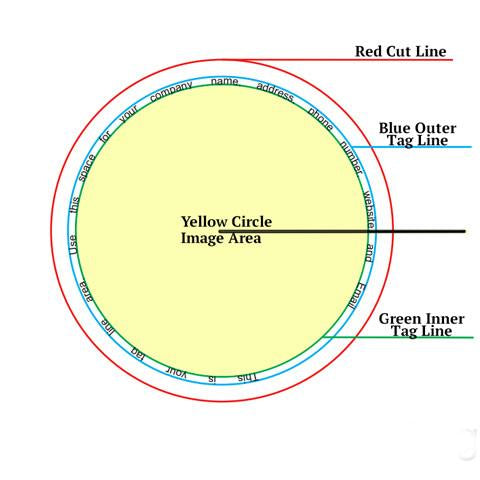
In the example above, the red circle is the cut line — line it up with your paper cutter for precise cuts. The blue circle is the print area, where you center your image or text. For a full-color button, extend your background color all the way out to the cut line.
Print your sheet, cut each design out with one of our circle cutters, and you're ready to press.
Full Sheet PDF Templates — Includes Taglines
PDF templates work with any design program that can place an image on a page, and they print correctly on any printer. If you are not sure which format to use, start here.
New: By popular demand we have added the dimensions to set up tag lines in your own graphic design software program. Tag lines allow you to put your contact information on the back side of the button. Click a button size below to download one of our free PDF button making templates — with or without taglines.
Need a machine to make these buttons?
Shop Kits By Size →Templates By Design Software
Prefer to work in a specific program? Open the section for your software below to download native template files, plus a short video tutorial showing how to lay out a button design in that program.
Adobe Photoshop — Free .PSD Button Templates
These are layered Photoshop files (.psd). Open the template for your button size, place your artwork on the lower layer, and keep the guide layer visible while you position it. Sizes 1.00" through 3.50" are available.
| Button Size | Photoshop Template | Get the Matching Kit |
|---|---|---|
| 1 inch | Photoshop Template — 1" buttons | → Get the 1.00" Kit |
| 1.25 inch | Photoshop Template — 1.25" buttons | → Get the 1.25" Kit |
| 1.5 inch | Photoshop Template — 1.5" buttons | → Get the 1.50" Kit |
| 1.75 inch | Photoshop Template — 1.75" buttons | → Get the 1.75" Kit |
| 2.25 inch | Photoshop Template — 2.25" buttons | → Get the 2.25" Kit (Bestseller) |
| 3 inch | Photoshop Template — 3" buttons | → Get the 3.00" Photo Kit |
| 3.5 inch | Photoshop Template — 3.5" buttons | → Get the 3.50" Photo Kit |
Photoshop Video Tutorial — How To Design A Button
Print Shop — Free .SIG Button Templates
These are native Print Shop files (.sig) for use with The Print Shop software. Sizes 1.00" through 6.00" are available, including our largest 6" template.
| Button Size | Print Shop Template | Get the Matching Kit |
|---|---|---|
| 1 inch | Print Shop Template — 1" buttons | → Get the 1.00" Kit |
| 1.25 inch | Print Shop Template — 1.25" buttons | → Get the 1.25" Kit |
| 1.5 inch | Print Shop Template — 1.5" buttons | → Get the 1.50" Kit |
| 1.75 inch | Print Shop Template — 1.75" buttons | → Get the 1.75" Kit |
| 2.25 inch | Print Shop Template — 2.25" buttons | → Get the 2.25" Kit (Bestseller) |
| 3 inch | Print Shop Template — 3" buttons | → Get the 3.00" Photo Kit |
| 3.5 inch | Print Shop Template — 3.5" buttons | → Get the 3.50" Photo Kit |
| 6 inch | Print Shop Template — 6" buttons | — |
Print Shop Video Tutorial — How To Design A Button
Open Office & LibreOffice — Free .ODG Button Templates
Open Office is a free, open-source software suite for graphics, presentations, word processing, and more. The templates below are provided as .odg files (Open Document Graphics format), which open directly in Open Office Draw or LibreOffice Draw.
| Button Size | Open Office Template | Get the Matching Kit |
|---|---|---|
| 1 inch | Open Office Template — 1" buttons | → Get the 1.00" Kit |
| 1.25 inch | Open Office Template — 1.25" buttons | → Get the 1.25" Kit |
| 1.5 inch | Open Office Template — 1.5" buttons | → Get the 1.50" Kit |
| 1.75 inch | Open Office Template — 1.75" buttons | → Get the 1.75" Kit |
| 2.25 inch | Open Office Template — 2.25" buttons | → Get the 2.25" Kit (Bestseller) |
| 3 inch | Open Office Template — 3" buttons | → Get the 3.00" Photo Kit |
| 3.5 inch | Open Office Template — 3.5" buttons | → Get the 3.50" Photo Kit |
| 6 inch | Open Office Template — 6" buttons | — |
Open Office Video Tutorial — How To Design A Button

Editable Canva Templates
Already work in Canva? These templates are set up for you — pick your button size, drop your design in online, and download a print-ready sheet in minutes.
Shop Canva Templates →Ready To Make Your Buttons? Shop Supplies By Size
Every template on this page is built to match a standard button size. Pick the size you are printing and we will show you the pinback buttons, magnets, key chains and other supplies that fit it. All orders ship from our Plano, Texas warehouse, and purchase orders from schools, libraries and government agencies are always welcome.
Not sure which size you need?
Our button size guide walks through what each size is commonly used for, from 1" classroom reward buttons up to 3.5" campaign and photo buttons. If you would rather talk it through, call us at (972) 985-5074.